About

Edit photo

Friday, February 12, 2016

Hadoop Word Count - step by step execution


Step1: Open eclipse -> File -> New -> Others


Select Maven Project 


The following picture is perfect and do the same


use the filer: org.apache.maven click next


Use Group Id and Artifact Id as the below pic, or you can write anything else


Well, Application project is created successfully, now write the program in step2:

Step2:
pom.xml is the important file, it contains the configuration files of the maven. add the hadoop dependency to the program by editing the pom.xml file.


Copy the following dependency code and use it in pom.xml file.

<dependency>
 <groupId>org.apache.hadoop</groupId>
 <artifactId>hadoop-core</artifactId>
 <version>1.2.1</version>
</dependency>


Step3:
Add new class file to the project as below


give the class name, here used wc and click finish.


Step4: The following is the basic Word Count program is used to find the words along with the repeated number.

Copy this code and use it in eclipse.

package npu.edu.hadoop;
import java.io.IOException;
import java.util.StringTokenizer;

import org.apache.hadoop.conf.Configuration;
import org.apache.hadoop.fs.Path;
import org.apache.hadoop.io.IntWritable;
import org.apache.hadoop.io.Text;
import org.apache.hadoop.mapreduce.Job;
import org.apache.hadoop.mapreduce.Mapper;
import org.apache.hadoop.mapreduce.Reducer;
import org.apache.hadoop.mapreduce.lib.input.FileInputFormat;
import org.apache.hadoop.mapreduce.lib.output.FileOutputFormat;
import org.apache.hadoop.util.GenericOptionsParser;
public class WordCount {
public static class TokenizerMapper
 extends Mapper<Object, Text, Text, IntWritable>{
private final static IntWritable one = new IntWritable(1);
private Text word = new Text();
public void map(Object key, Text value, Context context
 ) throws IOException, InterruptedException {
 StringTokenizer itr = new StringTokenizer(value.toString());
 while (itr.hasMoreTokens()) {
 word.set(itr.nextToken());
 context.write(word, one);
 }
 }
}
public static class IntSumReducer
 extends Reducer<Text,IntWritable,Text,IntWritable> {
private IntWritable result = new IntWritable();
public void reduce(Text key, Iterable<IntWritable> values,
 Context context
 ) throws IOException, InterruptedException {
 int sum = 0;
 for (IntWritable val : values) {
 sum += val.get();
 }
 result.set(sum);
 context.write(key, result);
 }
}
public static void main(String[] args) throws Exception {
Configuration conf = new Configuration();
String[] otherArgs = new GenericOptionsParser(conf,
args).getRemainingArgs();
if (otherArgs.length != 2) {
 System.err.println("Usage: WordCount <in> <out>");
 System.exit(2);
}
Job job = new Job(conf, "word count");
job.setJarByClass(WordCount.class);
job.setMapperClass(TokenizerMapper.class);
job.setCombinerClass(IntSumReducer.class);
job.setReducerClass(IntSumReducer.class);
job.setOutputKeyClass(Text.class);
job.setOutputValueClass(IntWritable.class);
FileInputFormat.addInputPath(job, new Path(otherArgs[0]));
FileOutputFormat.setOutputPath(job, new Path(otherArgs[1]));
System.exit(job.waitForCompletion(true) ? 0 : 1);
 }
}


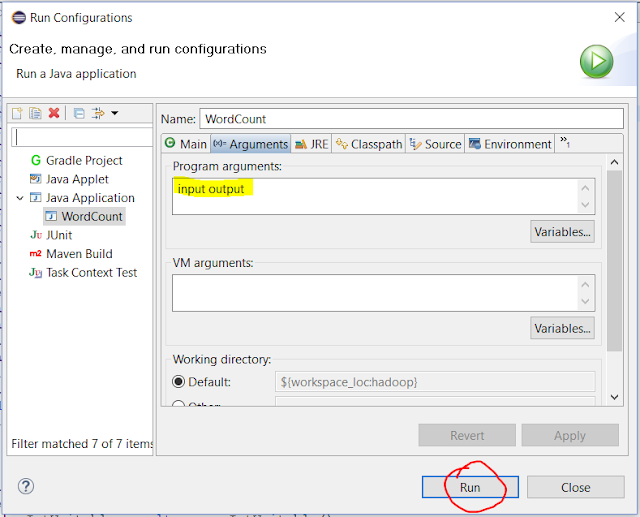
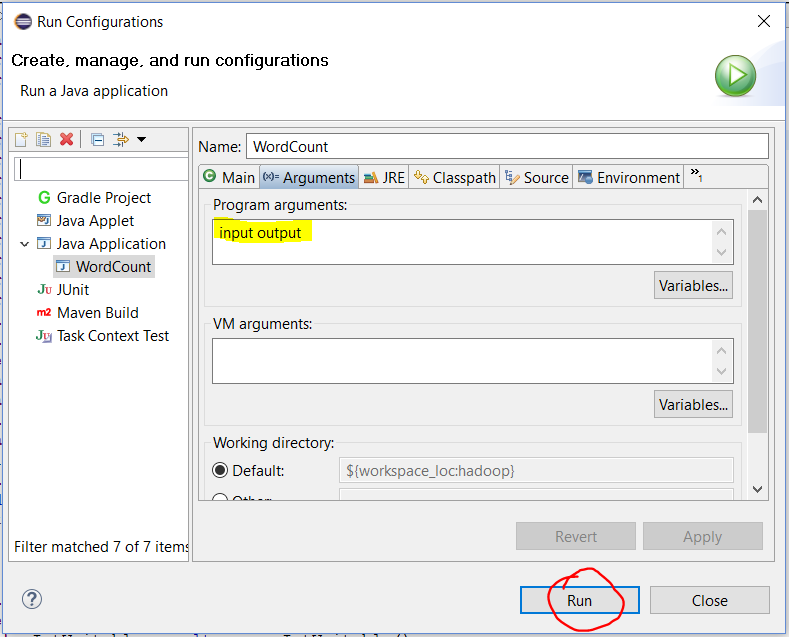
(Optional) Run -> Run configuration -> Arguments -> 
add (input output)


Step5: Run the code and you'll get the error like this, because we use eclipse is only for writing the program, and remaing task is to be done with Hadoop.

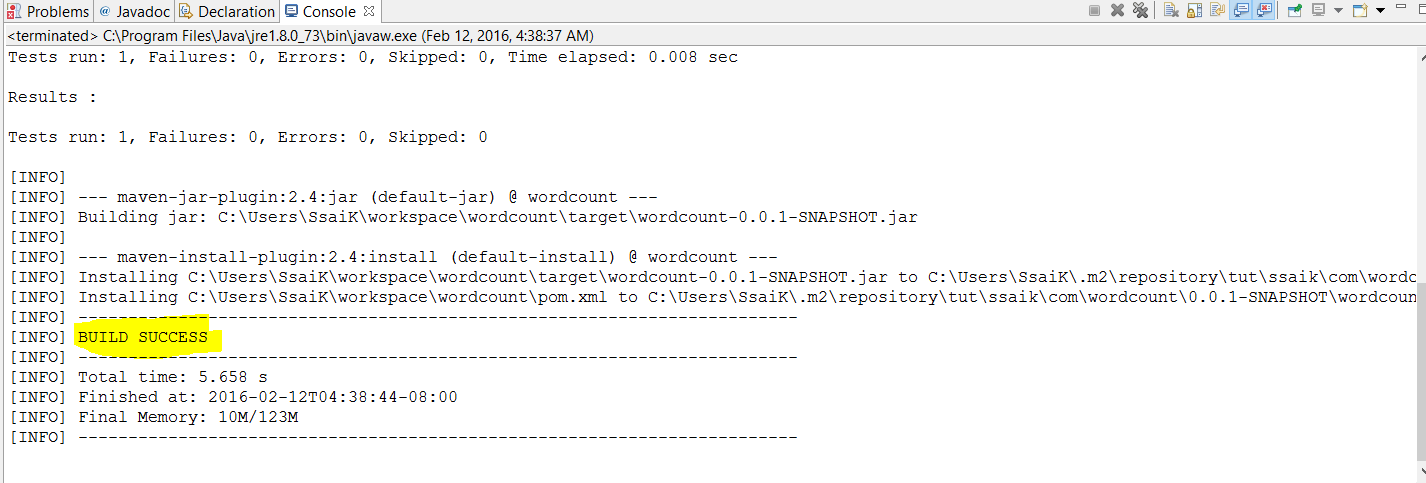
Right click on the project select Run As -> Maven Install .. you'll get Build Success, 
Build Failed? just try couple of times  of Maven Install, otherwise clear errors.


You'll get a *.jar file comes with the Build Success, find it in Target Directory.


How to Run the program in Hadoop? Click Here

If you like my Material, Like and Share and Please subscribe my Youtube Channel.

Thursday, February 4, 2016

how to delete windows.old in windows 10


One month after you upgrade to Windows 10, your previous version of Windows will be automatically deleted from your PC. However, if you need to free up disk space, and you’re confident that your files and settings are where you want them to be in Windows 10, you can safely delete it yourself. Keep in mind that you'll be deleting your Windows.old folder, which contains files that give you the option to go back to your previous version of Windows. Deleting your previous version of Windows can’t be undone.
  1. In the search box on the taskbar, type Settings, then select it from the list of results.

  1. Select System > Storage  > This PC and then scroll down the list and select Temporary files.


  1. Under Previous version of Windows, select Delete previous versions and then select Delete.

Source: Microsoft

Saturday, January 30, 2016

How to reset your password in Ubuntu


Its very simple to reset the password and create new one in just 5seconds...
First, you have to reboot into recovery mode.
If you have a single-boot (Ubuntu is the only operating system on your computer), to get the boot menu to show, you have to hold down the Shift key during bootup.

From the boot menu, select recovery mode, which is usually the second boot option.

After you select recovery mode and wait for all the boot-up processes to finish, you'll be presented with a few options. In this case, you want the Drop to root shell prompt option so press the Down arrow to get to that option, and then press Enter to select it.
The root account is the ultimate administrator and can do anything to the Ubuntu installation (including erase it), so please be careful with what commands you enter in the root terminal.
In recent versions of Ubuntu, the filesystem is mounted as read-only, so you need to enter the follow command to get it to remount as read-write, which will allow you to make changes:
mount -o rw,remount /

If you have forgotten your username as well, type
ls /home
That's a lowercase L, by the way, not a capital i, in ls. You should then see a list of the users on your Ubuntu installation. In this case, I'm going to reset Susan Brownmiller's password.
To reset the password, type
passwd username
where username is the username you want to reset. In this case, I want to reset Susan's password, so I type
passwd susan
You'll then be prompted for a new password. When you type the password you will get no visual response acknowledging your typing. Your password is still being accepted. Just type the password and hit Enter when you're done. You'll be prompted to retype the password. Do so and hit Enter again.
Now the password should be reset. Type
exit
to return to the recovery menu.


After you get back to the recovery menu, select resume normal boot, and use Ubuntu as you normally would—only this time, you actually know the password!

Monday, January 18, 2016

Friday, January 15, 2016

Thursday, December 10, 2015

Employee Datables Clone - SQL Plus


Use the following Queries to get Employee Database. It's pretty simple, Just execute the following Queries in the Sql Developer.

The Employee Management System contains 4 tables Empoyee (emp), Department (dept), Salary Grade (salgrade) and Bonus (bonus).


Creating Tables:
emp:
create table emp(
  empno    number(4,0),
  ename    varchar2(10),
  job      varchar2(9),
  mgr      number(4,0),
  hiredate date,
  sal      number(7,2),
  comm     number(7,2),
  deptno   number(2,0),
  constraint pk_emp primary key (empno),
  constraint fk_deptno foreign key (deptno) references dept (deptno)
);

dept:
create table dept(
  deptno number(2,0),
  dname  varchar2(14),
  loc    varchar2(13),
  constraint pk_dept primary key (deptno)
);

salgrade:
create table salgrade(
  grade number,
  losal number,
  hisal number
);

bonus:
create table bonus(
  ename varchar2(10),
  job   varchar2(9),
  sal   number,
  comm  number
);

Insert Data into Tables:

dept:
insert into dept
values(10, 'ACCOUNTING', 'NEW YORK');
insert into dept
values(20, 'RESEARCH', 'DALLAS');
insert into dept
values(30, 'SALES', 'CHICAGO');
insert into dept
values(40, 'OPERATIONS', 'BOSTON');

emp:
insert into emp
values(
 7839, 'KING', 'PRESIDENT', null,
 to_date('17-11-1981','dd-mm-yyyy'),
 5000, null, 10
);
insert into emp
values(
 7698, 'BLAKE', 'MANAGER', 7839,
 to_date('1-5-1981','dd-mm-yyyy'),
 2850, null, 30
);
insert into emp
values(
 7782, 'CLARK', 'MANAGER', 7839,
 to_date('9-6-1981','dd-mm-yyyy'),
 2450, null, 10
);
insert into emp
values(
 7566, 'JONES', 'MANAGER', 7839,
 to_date('2-4-1981','dd-mm-yyyy'),
 2975, null, 20
);
insert into emp
values(
 7788, 'SCOTT', 'ANALYST', 7566,
 to_date('13-JUL-87','dd-mm-rr') - 85,
 3000, null, 20
);
insert into emp
values(
 7902, 'FORD', 'ANALYST', 7566,
 to_date('3-12-1981','dd-mm-yyyy'),
 3000, null, 20
);
insert into emp
values(
 7369, 'SMITH', 'CLERK', 7902,
 to_date('17-12-1980','dd-mm-yyyy'),
 800, null, 20
);
insert into emp
values(
 7499, 'ALLEN', 'SALESMAN', 7698,
 to_date('20-2-1981','dd-mm-yyyy'),
 1600, 300, 30
);
insert into emp
values(
 7521, 'WARD', 'SALESMAN', 7698,
 to_date('22-2-1981','dd-mm-yyyy'),
 1250, 500, 30
);
insert into emp
values(
 7654, 'MARTIN', 'SALESMAN', 7698,
 to_date('28-9-1981','dd-mm-yyyy'),
 1250, 1400, 30
);
insert into emp
values(
 7844, 'TURNER', 'SALESMAN', 7698,
 to_date('8-9-1981','dd-mm-yyyy'),
 1500, 0, 30
);
insert into emp
values(
 7876, 'ADAMS', 'CLERK', 7788,
 to_date('13-JUL-87', 'dd-mm-rr') - 51,
 1100, null, 20
);
insert into emp
values(
 7900, 'JAMES', 'CLERK', 7698,
 to_date('3-12-1981','dd-mm-yyyy'),
 950, null, 30
);
insert into emp
values(
 7934, 'MILLER', 'CLERK', 7782,
 to_date('23-1-1982','dd-mm-yyyy'),
 1300, null, 10
);

salgrade:
insert into salgrade
values (1, 700, 1200);
insert into salgrade
values (2, 1201, 1400);
insert into salgrade
values (3, 1401, 2000);
insert into salgrade
values (4, 2001, 3000);
insert into salgrade
values (5, 3001, 9999);

Wednesday, December 2, 2015

Fraction Java Program


This is for just for learning.


1)
Save it as fractionClass.java

package package_name;

/**
 *
 * @author <name>
 */
public class fractionClass {

    /**
     * @param args the command line arguments
     */
    public static void main(String[] args) {
        // TODO code application logic here
        FractionUtil.menuAssignment5();
    }
    
}

2)
save it as Fraction.java
package package_name;

public class Fraction implements Cloneable, Comparable<Fraction> {
    private int num;
    private int denom;
    public Fraction() {
        denom = 1;
    }
    public Fraction(Fraction fr) {
        num = fr.num;
        denom = fr.denom;
    }
    public Fraction(int arg) {
        num = arg;
        denom = 1;
    }
    public Fraction(int arg1, int arg2) {
        int gcd;
        
        if (arg2 == 0) {
            // You should check and throw and exception.
            // For here, let's make it simple!
            num = 0;
            denom = 1;
        } else { // You may want to update the logic below.
            if (arg2 < 0) {
                arg1 = -arg1;
                arg2 = -arg2;
            }
        
            if (arg1 != 0) {
                do { // Check if the loop is needed!
                    gcd = computeGcd(arg1, arg2);
                    num = arg1 / gcd;
                    denom = arg2 / gcd;
                } while (gcd != 1);
            } else {
                // should we throw an exception here and return null?
                num = 0;
                denom = 1;
            }
        }
    }
    public int getNum() {
        return num;
    }
    public int getDenom() {
        return denom;
    }
    public void setNum(int arg) {
        num = arg;
    }
    public void setDenom(int arg) {
        if (arg < 0) {
            num = -num;
            denom = -arg;
        } else if (arg > 0) {
            denom = arg;
        } else {
            // You should check and throw and exception.
            // For here, let's make it simple!
            num = 0;
            denom = 1;
        }
    }
    
    // Let's use this gcd()
    public int computeGcd(int arg1, int arg2) {
        int gcd = 1;
        int i;
        arg1 = (arg1 < 0) ? -arg1 : arg1;
        for (i = 2; i <= arg1 && i <= arg2; i++) {
            if (arg1 % i == 0 && arg2 % i == 0) {
                gcd = i;
            }        
        }
        return gcd;
    }
    public Fraction add(Fraction rOp) {
        return new Fraction(num * rOp.denom + denom * rOp.num, 
            denom * rOp.denom);
    }
    public Fraction subtract(Fraction rOp) {
        return new Fraction(num * rOp.denom - denom * rOp.num,
            denom * rOp.denom);
    }
    public Fraction multiply(Fraction rOp) {
        return new Fraction(num * rOp.num, denom * rOp.denom);
    }
    public Fraction divide(Fraction rOp) {
        try {
            Fraction fr1 = new Fraction(num * rOp.denom, denom * rOp.num);
            return fr1;
        } catch (ArithmeticException e) {
          //System.out.println(e.getMessage());
          //e.printStackTrace();
            return null;
        }
      /*
      The java.lang.throwable class provides the following methods:
          +getMesage(): String
              Returns the message the describes the exception object.
          +toString(): String
              Returns the concatenated string of (1) the fullname of the 
              exception class; (2) “: ” (a colon and a space); and (3) the 
              getMessage() method.
          +printStackTrace(): void
              Prints the Throwable object and its call stack trace 
              information.
          +getStackTrace(): StackTraceElement[]
              Returns an array of trace elements representing the stack
              trace for the exception object.
      */
    }
    public void print() {
        System.out.print("\n" + num + "/" + denom + "\n");
    }
  
    @Override
    public Object clone() {
        try {
            //Fraction fr = (Fraction) super.clone();
            //fr.num = num;
            //fr.denom = denom;
            //return fr;
            return (Fraction) super.clone();
        } catch (CloneNotSupportedException e) {
            return null;
        }
    }
  
    @Override
    public int compareTo(Fraction f) {
        if (num * f.denom > denom * f.num)
            return 1;
        else if (num * f.denom < denom * f.num)
            return -1;
        else
            return 0;
    }
  
    @Override
    public String toString() {
        return super.toString() + "\n  num : " + num + "\n  denom : " + denom;
    }
}


3. 
save it as FractionUtil.java
package package_name;
import java.util.Scanner;

public class FractionUtil {
    public static Fraction add(Fraction f1, Fraction f2) {
        return new Fraction(f1.getNum() * f2.getDenom() + 
                f1.getDenom() * f2.getNum(), f1.getDenom() * f2.getDenom());
    }
    
    public static Fraction subtract(Fraction f1, Fraction f2) {
        return new Fraction(f1.getNum() * f2.getDenom() - 
                f1.getDenom() * f2.getNum(), f1.getDenom() * f2.getDenom());
    }
    
    public static Fraction multiply(Fraction f1, Fraction f2) {
        return new Fraction(f1.getNum() * f2.getNum(), f1.getDenom() * f2.getDenom());
    }
    
    public static Fraction divide(Fraction f1, Fraction f2) {
        return new Fraction(f1.getNum() * f2.getDenom(), f1.getDenom() * f2.getNum());
    }
    
    public static void addMenu(Fraction[] fAry) {
        //Fraction[] frAry = new Fraction[2];
        Fraction res = null;
        int option;
        Scanner scanner = new Scanner(System.in);
        //fAry[1] = new Fraction(1, 3);
        //fAry[2] = new Fraction(5, 6);
        do {
            System.out.print("\n\n*****" +
              "\n*   MENU -- addMenu()" + 
              "\n*     (1) Member add()" +
              "\n*     (2) Stand-Alone add()" +
              "\n*     (3) Quit - addMenu()" +
              "\n*****" +
              "\nEnter your option (1 - 3): ");
            option = scanner.nextInt();
            switch (option) {
                case 1:
                    System.out.print("\n      Using lFr.add(rFr)\n");
                    res = fAry[0].add(fAry[1]);
                    
                    // Fill in your code to display the result here
                    //Output of the Member add()
                    System.out.print(res);
                    break;
                case 2:
                    System.out.print("\n      Using lFr.add(rFr)\n");
                    res = add(fAry[0], fAry[1]);
                    
                    // Fill in your code to display the result here
                    System.out.print(res);
                    break;
                case 3: 
                    System.out.println("\n Fun operations -- Quit!");
                    break;
                default:
                    System.out.println("\n WRONG OPTION!");
            }
        } while (option != 3); 
    }
    
    public static void subtractMenu(Fraction[] fAry) {
        //Fraction[] frAry = new Fraction[2];
        Fraction res = null;
        int option;
        Scanner scanner = new Scanner(System.in);
        //fAry[1] = new Fraction(1, 3);
        //fAry[2] = new Fraction(5, 6);
        do {
            System.out.print("\n\n*****" +
              "\n*   MENU -- subMenu()" + 
              "\n*     (1) Member subtract()" +
              "\n*     (2) Stand-Alone subtract()" +
              "\n*     (3) Quit - subtractMenu()" +
              "\n*****" +
              "\nEnter your option (1 - 3): ");
            option = scanner.nextInt();
            switch (option) {
                case 1:
                    System.out.print("\n      Using lFr.subtract(rFr)\n");
                    res = fAry[0].subtract(fAry[1]);
                    
                    // Fill in your code to display the result here
                    //Output of the Member subtract()
                    System.out.print(res);
                    break;
                case 2:
                    System.out.print("\n      Using lFr.subtract(rFr)\n");
                    res = subtract(fAry[0], fAry[1]);
                    
                    // Fill in your code to display the result here
                    System.out.print(res);
                    break;
                case 3: 
                    System.out.println("\n Fun operations -- Quit!");
                    break;
                default:
                    System.out.println("\n WRONG OPTION!");
            }
        } while (option != 3); 
    }
    
    public static void multiplyMenu(Fraction[] fAry) {
        //Fraction[] frAry = new Fraction[2];
        Fraction res = null;
        int option;
        Scanner scanner = new Scanner(System.in);
        //fAry[1] = new Fraction(1, 3);
        //fAry[2] = new Fraction(5, 6);
        do {
            System.out.print("\n\n*****" +
              "\n*   MENU -- multiplyMenu()" + 
              "\n*     (1) Member multiply()" +
              "\n*     (2) Stand-Alone multiply()" +
              "\n*     (3) Quit - multiplyMenu()" +
              "\n*****" +
              "\nEnter your option (1 - 3): ");
            option = scanner.nextInt();
            switch (option) {
                case 1:
                    System.out.print("\n      Using lFr.multiply(rFr)\n");
                    res = fAry[0].multiply(fAry[1]);
                    
                    // Fill in your code to display the result here
                    //Output of the Member multiply()
                    System.out.print(res);
                    break;
                case 2:
                    System.out.print("\n      Using lFr.multiply(rFr)\n");
                    res = multiply(fAry[0], fAry[1]);
                    
                    // Fill in your code to display the result here
                    System.out.print(res);
                    break;
                case 3: 
                    System.out.println("\n Fun operations -- Quit!");
                    break;
                default:
                    System.out.println("\n WRONG OPTION!");
            }
        } while (option != 3); 
    }
    
    public static void divideMenu(Fraction[] fAry) {
        //Fraction[] frAry = new Fraction[2];
        Fraction res = null;
        int option;
        Scanner scanner = new Scanner(System.in);
        //fAry[1] = new Fraction(1, 3);
        //fAry[2] = new Fraction(5, 6);
        do {
            System.out.print("\n\n*****" +
              "\n*   MENU -- divideMenu()" + 
              "\n*     (1) Member divide()" +
              "\n*     (2) Stand-Alone divide()" +
              "\n*     (3) Quit - divideMenu()" +
              "\n*****" +
              "\nEnter your option (1 - 3): ");
            option = scanner.nextInt();
            switch (option) {
                case 1:
                    System.out.print("\n      Using lFr.divide(rFr)\n");
                    res = fAry[0].divide(fAry[1]);
                    
                    // Fill in your code to display the result here
                    //Output of the Member divide()
                    System.out.print(res);
                    break;
                case 2:
                    System.out.print("\n      Using lFr.divide(rFr)\n");
                    res = divide(fAry[0], fAry[1]);
                    
                    // Fill in your code to display the result here
                    System.out.print(res);
                    break;
                case 3: 
                    System.out.println("\n Fun operations -- Quit!");
                    break;
                default:
                    System.out.println("\n WRONG OPTION!");
            }
        } while (option != 3); 
    }
    
    
    public static void init(Fraction[] fAry) {
        int option;
        int n;
        int d;
        Scanner scanner = new Scanner(System.in);
        do {
            System.out.print("\n\n*****" +
              "\n*   MENU -- init()" + 
              "\n*     (1) Creating 2 Fraction Objects" +
              "\n*     (2) Updating 2 Fraction Objects" +
              "\n*     (3) Updating LEFT Fraction Object" +
              "\n*     (4) Updating RIGHT Fraction Object" +
              "\n*     (5) Quit - init()" +
              "\n*****" +
              "\nEnter your option (1 - 5): ");
            option = scanner.nextInt();
      
            switch (option) {
            case 1:
                System.out.print("\nCreating 2 Fraction objects ..." +
                        "\n  For the left Fraction -" +
                        "\n    Enter the numerator: ");
                n = scanner.nextInt();
                System.out.print("\n    Enter the denominator: ");
                d = scanner.nextInt();
                
                fAry[0] = new Fraction(n, d);
                
                System.out.print("\n  For the right Fraction -" +
                        "\n    Enter the numerator: ");
                n = scanner.nextInt();
                System.out.print("\n    Enter the denominator: ");
                d = scanner.nextInt();
                
                fAry[1] = new Fraction(n, d);
                //SsaiK Added
                //addMenu(fAry);
                break;
            case 2: // There MUST be 2 existing Fraction objects
                System.out.print("\nUpdatting 2 Fraction objects ..." +
                        "\n  For the left Fraction -" +
                        "\n    Enter the numerator: ");
                n = scanner.nextInt();
                fAry[0].setNum(n);
                
                System.out.print("\n    Enter the denominator: ");
                d = scanner.nextInt();
                fAry[0].setDenom(d);
                
                System.out.print("\n  For the right Fraction -" +
                        "\n    Enter the numerator: ");
                n = scanner.nextInt();
                fAry[1].setNum(n);
                
                System.out.print("\n    Enter the denominator: ");
                d = scanner.nextInt();
                fAry[1].setDenom(d);
                
                break;
            case 3:
                System.out.print("\nUpdating left Fraction object ...!\n    Enter the left numerator: ");
                n = scanner.nextInt();
                fAry[0].setNum(n);
                
                System.out.print("\n    Enter the left denominator: ");
                d = scanner.nextInt();
                fAry[0].setDenom(d);
                System.out.println("Left fraction updated successfully");
                break;
            case 4:
                System.out.print("\nUpdating right Fraction object ...!\n    Enter the right numerator: ");
                n = scanner.nextInt();
                fAry[1].setNum(n);
                
                System.out.print("\n    Enter the right denominator: ");
                d = scanner.nextInt();
                fAry[1].setDenom(d);
                System.out.println("Right fraction updated successfully");
                break;
            case 5:
                System.out.print("\nQuit ...!\n");
                break;
            default:
                System.out.print("\nWRONG OPTION!\n");
            }
        } while (option != 5);
    }
    
    public static void menuAssignment5() {
        Fraction[] frAry = new Fraction[2];
        int option;
        Scanner scanner = new Scanner(System.in);
    
        do {
            System.out.print("\n\n*****" +
              "\n* MENU -- Assignment 5" + 
              "\n*   (1) Calling init()" +
              "\n*   (2) Addition" +
              "\n*   (3) Subtraction" +
              "\n*   (4) Multiplication" +
              "\n*   (5) Division" +
              "\n*   (6) GCD" +
              "\n*   (7) Quit" +
              "\n*****" +
              "\nEnter your option (use integer value only): ");
            option = scanner.nextInt();
      
            switch (option) {
            case 1:
                System.out.print("\nCalling init() ...");
                init(frAry); // FractionUtil.init(frAry);
                break;
            case 2:
                System.out.print("\nPerforming the addition ...!\n");
                addMenu(frAry);
                break;
            case 3:
                System.out.print("\nPerforming the subtraction ...!\n");
                subtractMenu(frAry);
                break;
            case 4:
                System.out.print("\nPerforming the multiplication ...!\n");
                multiplyMenu(frAry);
                break;
            case 5:
                System.out.print("\nPerforming the GCD ...!\n");
                divideMenu(frAry);
                break;
            case 6:
                System.out.print("\nPerforming the GCD ...!\n");
                System.out.print("GCD of the left fraction is"+getGcd(frAry[0].getNum(),frAry[0].getDenom()));
                System.out.print("GCD of the right fraction is"+getGcd(frAry[1].getNum(),frAry[1].getDenom()));
                break;
            case 7:
                System.out.print("\nQuit ...!\n");
                break;
            default:
                System.out.print("\nWRONG OPTION!\n");
            }
        } while (option != 7);
    }
    
    // Let's use this gcd()
    public static int getGcd(int arg1, int arg2) {
        int gcd = 1;
        int i;
        arg1 = (arg1 < 0) ? -arg1 : arg1;
        arg2 = (arg2 < 0) ? -arg2 : arg2;
        for (i = 2; i <= arg1 && i <= arg2; i++) {
            if (arg1 % i == 0 && arg2 % i == 0) {
                gcd = i;
            }        
        }
        return gcd;
    }
}