

Salesforce Visualforce Pages Beginner component examples

Code:
<apex:page >
    <apex:sectionHeader title="Section1" subtitle="Subtitle1" description="Description1" help="http://google.com" rendered="true"/>
</apex:page>
What is Global Data? how can we use it in VF pages in Salesforce?
Global data is nothing but accessible in globally. we have many Global variables available in salesforce, refer the link to get all types of Global Variables.
https://help.salesforce.com/articleView?id=dev_understanding_global_variables.htm&language=en_US&type=0
Some Commonly used Global variables are
$User
$Label
$ObjectType
$Organization
$Permission
$Profile
$System
$UserRole

Code:
<apex:page controller="calAge">
    <apex:sectionHeader title="Section1" subtitle="Subtitle1" description="Description1" help="http://google.com" rendered="true"/>

    Lastname: <b>{!$User.LastName}</b> <br/>
    Organization: <b>{!$Organization.Name}</b> <br/>
    Profile: <b>{!$Profile.Name}</b>

</apex:page>
How to Parse Data from URL?
{!$CurrentPage.Parameters.parameterName} is used to get Parameters from URL.
Example, Display Name, Age and Gender from URL in VF page.

Code:
<apex:page>
    <apex:sectionHeader title="Section1" subtitle="Subtitle1" description="Description1" help="http://google.com" rendered="true"/>

    Lastname: <b>{!$User.LastName}</b> <br/>
    Organization: <b>{!$Organization.Name}</b> <br/>
    Profile: <b>{!$Profile.Name}</b>

    Parameters from URL: -> {! $CurrentPage.Parameters.Name}, {! $CurrentPage.Parameters.Age}, {! $CurrentPage.Parameters.Gender}

</apex:page>
What is Controller in VF page?
There are two type of controllers in the salesforce, named Standard Controller and Custom Controller.
Standard Controller :-> StandardController = '<Standard Object Name>'
Custom Controller :-> Controller = '<Apex class name>'
Extension :-> Extension = '<Apex class name>'
Example: Get account name, Note: can't get account name until id parameters parsed in URL.
URL?id=0014100000S6O0s

Code:
<apex:page StandardController="Account">
    <apex:sectionHeader title="Section1" subtitle="Subtitle1" description="Description1" help="http://google.com" rendered="true"/>

    Lastname: <b>{!$User.LastName}</b> <br/>
    Organization: <b>{!$Organization.Name}</b> <br/>
    Profile: <b>{!$Profile.Name}</b><br/><br/>

    Account name: {! Account.name}

</apex:page>
Example 2: Get list of Account names from Account object.
It's time to use DataTable, if there are nay repetitive records or list of records, DataTable is required.
<!-- Updated soon-->
What are Output Components in VF page?
Output components are used to display the data, it works just like label in HTML.
OutputLabel -> Cannot Edit, Read only
OutputText -> Connot Edit, Read only
OutputField -> Can Edit, if used InlineEditing option.

Code:
<apex:page StandardController="Account">
    <apex:sectionHeader title="Section1" subtitle="Subtitle1" description="Description1" help="http://google.com" rendered="true"/>

    Lastname: <b>{!$User.LastName}</b> <br/>
    Organization: <b>{!$Organization.Name}</b> <br/>
    Profile: <b>{!$Profile.Name}</b><br/><br/>

    <apex:form >
        <apex:inlineEditSupport >
            <apex:outputLabel value="{!account.name}"/>   <br/>
            <apex:outputText value="{!account.name}"/>   <br/>
            <apex:outputField value="{!account.name}"/>   <br/>
        </apex:inlineEditSupport>
    </apex:form>
</apex:page>
What are Input components in VF pages? and example.
Input components are used to input the values to the object, it is like Textbox in VisualStudio, inputField in HTML.
inputText -> Used to Input text, irrespective to datatype
inputlabel -> same as inutText, irrespective to datatype
inputField -> Same as inputText, respective to Datatype
inputSecret -> Password type
inputHidden -> Hidden Mode
What are Select Components in VF page? and Example.
Used to select multiple/single (Ex: picklist/Radio/checkbox) value from list of options.
SelectList
SelectOption -> Options in the picklist are created using this components
SelectOptions -> When list of options are already available in List datatype.
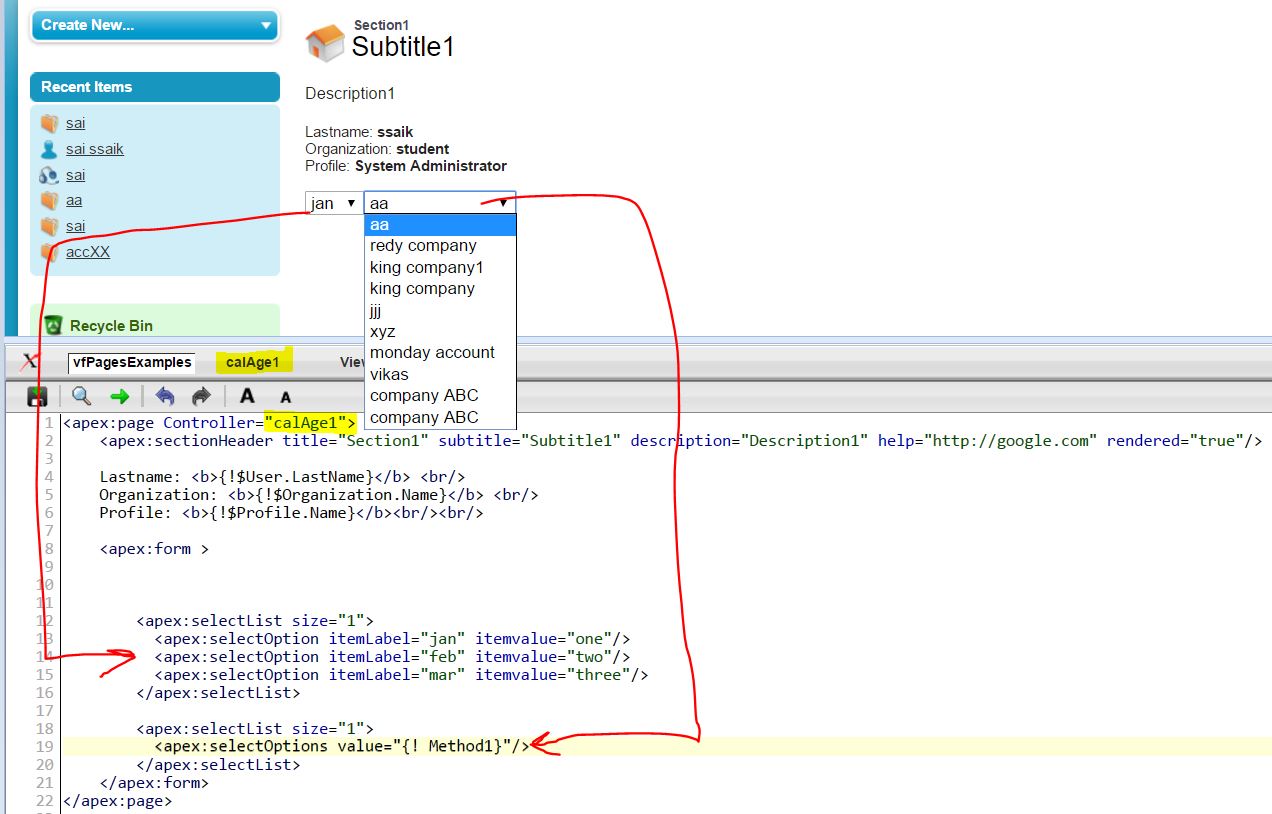

Code:
VF Page:
<apex:page Controller="calAge1">
    <apex:sectionHeader title="Section1" subtitle="Subtitle1" description="Description1" help="http://google.com" rendered="true"/>

    Lastname: <b>{!$User.LastName}</b> <br/>
    Organization: <b>{!$Organization.Name}</b> <br/>
    Profile: <b>{!$Profile.Name}</b><br/><br/>

    <apex:form >
        <apex:selectList size="1">
          <apex:selectOption itemLabel="jan" itemvalue="one"/>
          <apex:selectOption itemLabel="feb" itemvalue="two"/>
          <apex:selectOption itemLabel="mar" itemvalue="three"/>
        </apex:selectList>

        <apex:selectList size="1">
          <apex:selectOptions value="{! Method1}"/>
        </apex:selectList>
    </apex:form>
</apex:page>
Apex Custom Controller:
public with sharing class calAge1 {
    public List<SelectOption> getMethod1()
    {
        List<Account> lname = [Select name from account limit 10];
        List<SelectOption> ll = new List<SelectOption>();
        for(integer i=0;i<10;i++)
        {
            ll.add(new selectOption(String.valueOf(i),String.valueOf(lname[i].name)));
        }
        return ll;
    }
}
by
SsaiK


